


2026-10-28. 07:52
Description: Add notes & annotations to any PDF document - comments, corrections, signatures, highlighting, even photos, designs and drawings.
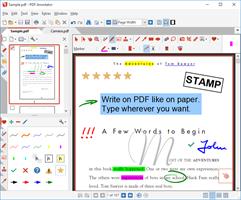
How does PDF Annotator work?
- Add notes & annotations to any PDF document:
Comments, corrections, signatures, highlighting, even photos and drawings.
And on Tablet PCs: Handwritten annotations.
- Save annotations in the original file.
Share them with coworkers, email them to clients, partners or back to authors.
No special software is needed to view the marked up document!
- Restore to the original document at any time.
Remove or hide all markup with a single click.
- Insert blank pages for more space.
Combine documents, copy, re-order or remove pages.
- Use PDF Annotator's unique presentation mode:
Deliver outstanding interactive presentations in meetings or lectures with PDF Annotator as your "digital whiteboard".
Who needs PDF Annotator?
You do, if you want to:
- Make a short comment on a long document
- Fill in or sign a form or agreement, and return it by email
- Proofread, review and correct a document right on your screen
- Make notes and drawings right on the pages
- Illustrate your ideas and suggestions
- Grade student papers right on your PC, laptop or Tablet PC
Release Name: PDF Annotator 10.0.0.1016
[b]Size:[/b] 234.2 MB
Idézet:A kódrészlet megtekintéséhez be kell jelentkezned, vagy nincs jogosultságod a tartalom megtekintéséhez.


